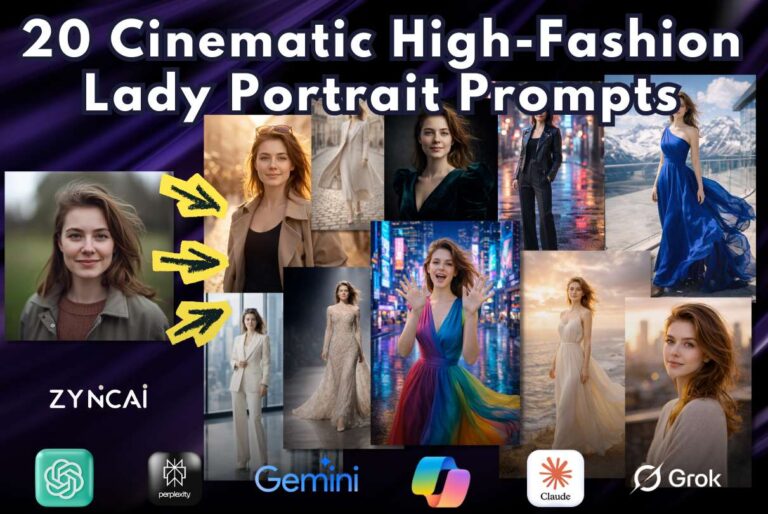
Ladies; Turn Your Boring Photo Into a Fashion Insta Look (Copy-Paste Prompts)
Ever looked at your photo and thought, “This could be so much better”?
You are not alone. Not everyone has access to professional photographers, luxury outfits, or perfectly styled locations. But thanks to AI, you don’t need them anymore.
In this guide, I will show you how ladies can transform ordinary photos into fashion-ready Instagram looks using AI tools and simple copy paste prompts, no editing skills required.
Let’s turn everyday photos into confident, stylish, scroll-stopping visuals 💄📸
1. Introduction: From Ordinary to Insta-Fashion
Most photos feel boring not because you look boring. It is mainly because,,
- Lighting is flat
- Poses lack confidence
- Backgrounds feel uninspiring
- Styling doesn’t pop on camera
AI changes that.
With the right tools and prompts, you can generate editorial-style, high-fashion portraits that look like they came straight from a magazine shoot. This guide is designed for ladies who want stylish Instagram content without expensive photoshoots.
By the end, you will know:
- Which AI tools to use
- How to upload your photo correctly
- What to consider for realistic results
- How to stay safe with your privacy
2. What Is a Fashion-Ready Insta Look?
A fashion-ready Insta look is not just about filters. It is about presentation and presence.
A true fashion-style AI image includes,
- Professional-looking lighting
- Strong posture and body language
- High-fashion or couture-inspired outfits
- Clean or cinematic backgrounds
- Editorial color grading
Casual selfie vs Fashion portrait
| Casual Photo | Fashion-Ready Look |
|---|---|
| Flat lighting | Sculpted lighting |
| Relaxed pose | Intentional posture |
| Busy background | Styled scene |
| Filters | Editorial realism |
AI helps you upgrade the entire visual story. Not just only your face!..
3. AI Tools You Can Use to Generate Fashion Images
All the tools below let you upload your own photo and generate new, stylish fashion images using prompts.
No drawing, no Photoshop, no professional camera, just your photo and the right prompt.
Recommended AI Tools for Image Generation
1. Gemini
Gemini can work with uploaded images and help generate or refine image outputs depending on the workflow used. It’s especially useful for concept-based image generation and refining fashion ideas from an existing photo.
Best for image generation:
Concept exploration and structured fashion image transformations.
2. ChatGPT
ChatGPT allows you to upload your photo as a reference image and generate a brand-new fashion portrait using detailed prompts. It works especially well for preserving facial identity, skin texture, and natural expressions while changing outfits, poses, and backgrounds.
Best for image generation:
Ladies who want realistic, Instagram-ready fashion images with simple copy-paste prompts.
3. Midjourney
Midjourney lets you upload your photo inside Discord and generate high-fashion images by referencing that photo. It excels at transforming normal photos into editorial, runway-style visuals with dramatic lighting and couture outfits.
Best for image generation:
High-fashion, magazine-style images with bold styling and artistic flair.
4. Adobe Firefly
Adobe Firefly supports image-to-image generation, meaning you upload your photo and use prompts to generate a new fashion look while maintaining structure and realism. It focuses on clean, professional outputs that feel natural and safe to share online.
Best for image generation:
Clean, brand-safe fashion images suitable for public posting and promotions.
5. Runway
Runway lets you upload an image and generate new visuals using AI models that support style changes, scene transformation, and lighting control. It’s powerful for turning simple photos into cinematic fashion visuals.
Best for image generation:
Cinematic, creative fashion looks with advanced visual styling.
6. Leonardo AI
Leonardo AI allows image uploads and gives strong control over pose, outfit style, realism, and lighting. It generates fashion images that look close to real photography, making it ideal for elegant and polished Instagram content.
Best for image generation:
Photorealistic fashion portraits with controlled poses and outfit details.
7. DALL·E
DALL·E supports image upload and prompt-based image generation, allowing you to transform a basic photo into a styled fashion portrait with new outfits, backgrounds, and lighting while keeping the face recognizable.
Best for image generation:
Simple, controlled fashion transformations with clean visuals.
8. Playground AI
Playground AI lets you upload photos and quickly generate new images using style presets and prompts. It’s useful for testing different fashion poses and outfits from a single original photo.
Best for image generation:
Quick fashion image variations and pose experimentation.
Which Tool Should You Choose?
- New to AI image generation?
→ ChatGPT or Adobe Firefly - Fashion/editorial Instagram looks?
→ Midjourney or Leonardo AI - Concept refinement before final images?
→ Gemini - Cinematic & creative transformations?
→ Runway or Playground AI - Clean and simple fashion edits?
→ DALL·E
4. How to Turn a Normal Photo Into a Fashion Insta Look (Step-by-Step)
Step 1: Choose the Right Photo
Use a photo where:
- Your face is clearly visible
- Lighting is decent (natural light works best)
- No heavy filters or blur
- Neutral expression is okay (AI handles mood)
📌 Tip: A simple phone photo is more than enough.
Step 2: Upload Your Image to the AI Tool
Inside the AI tool:
- Look for image upload / reference image
- Upload one clear image (avoid multiple faces)
- Keep resolution reasonable (not too compressed)
Step 3: Copy-Paste a Fashion Prompt
Your prompt tells the AI:
- Who you are
- What posture you want
- What outfit style to generate
- How realistic the image should be
Identity phrases like
“using the uploaded image as the exact facial identity reference”
are crucial for natural results.
Step 4: Generate & Review
Check:
- Facial resemblance
- Body proportions
- Outfit realism
- Lighting balance
If something feels off, don’t worry. That’s normal.
Step 5: Refine & Regenerate
Small changes go a long way:
- Adjust lighting description
- Simplify outfit colors
- Change pose wording
AI rewards clarity, not complexity.
5. Copy-Paste Fashion Prompts
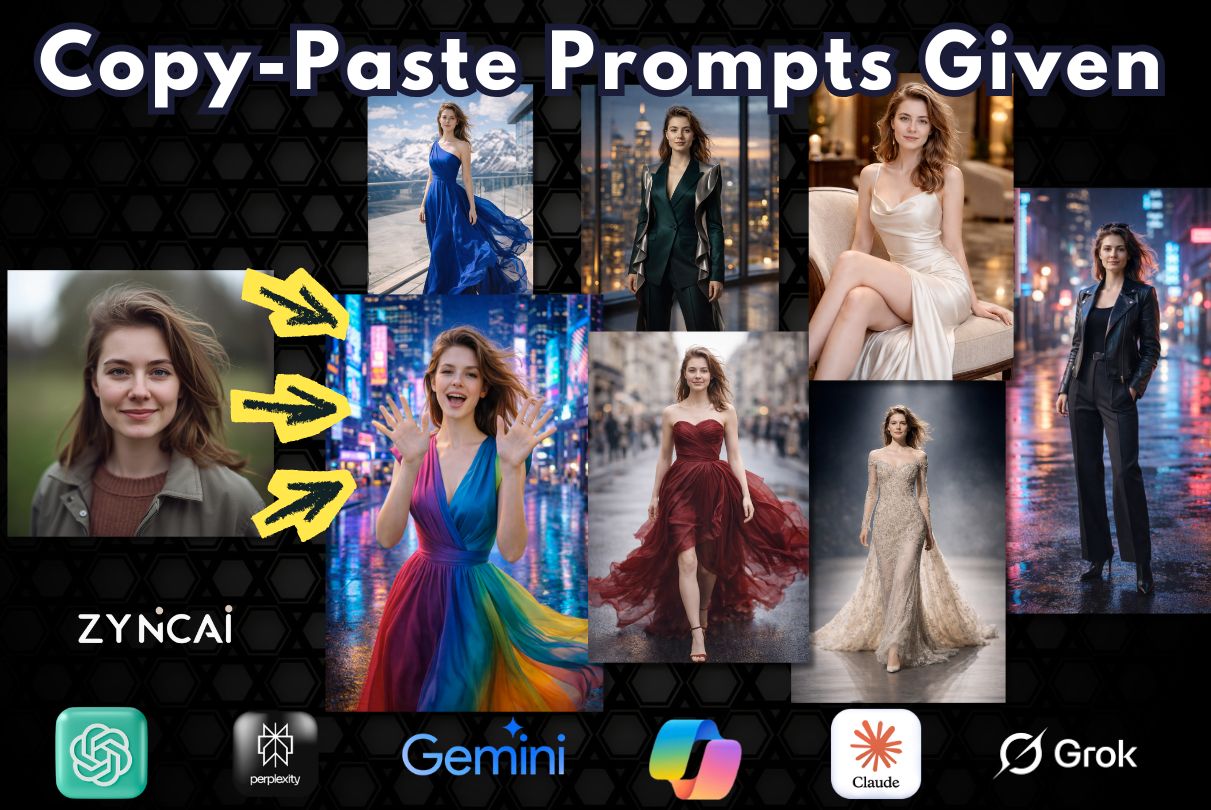
Prompt 01. Neon Skyline Empress: Futuristic Couture Statement
Description:
A bold full-body fashion portrait set against a glowing cyberpunk skyline. Vibrant couture meets electric city energy.
Prompt:
Using the uploaded image as the exact facial identity reference, generate a hyper-realistic full-body high-fashion portrait set in a futuristic neon cityscape at night with holographic billboards and glowing skyscrapers. Preserve exact facial proportions, realistic skin texture with visible micro-details, and accurate body proportions. She stands confidently in the center wearing a dramatic multicolored couture gown featuring electric blue, magenta, and neon green panels with structured shoulders and flowing fabric. Capture vertically as if shot with an 85mm lens at f/1.8 to create shallow depth of field while maintaining vibrant neon bokeh in the background. Lighting should combine cool neon rim lights with soft frontal illumination to sculpt her silhouette naturally. Add subtle reflections of neon colors on the fabric and polished pavement. Enhance realistic fabric folds, light diffusion, and dynamic hair movement. Apply cinematic cyberpunk color grading with high contrast, luminous highlights, and ultra-detailed 8K photorealistic clarity.
![Prompt 06 - Neon Skyline Empress - Cinematic Executive Colorful High Fashion Lady Prompts [ ZyncAI.com ]](https://zyncai.com/wp-content/uploads/2026/02/Prompt-06-Neon-Skyline-Empress-Cinematic-Executive-Colorful-High-Fashion-Lady-Prompts-ZyncAI.com-.jpg)
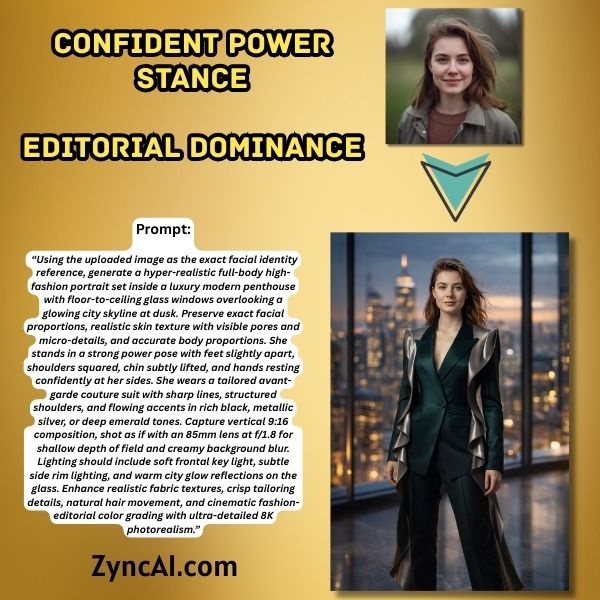
Prompt 02. Confident Power Stance (Editorial Dominance)
This prompt transforms your uploaded photo into a bold, high-fashion editorial portrait set inside a luxury penthouse overlooking a glowing city skyline. It focuses on a strong power stance, feet grounded, shoulders squared, and posture confident, creating an image that feels commanding and polished. The tailored couture suit, cinematic dusk lighting, and shallow depth of field combine to deliver a magazine-worthy fashion look that highlights confidence, elegance, and modern sophistication while preserving realistic facial features and natural details.
Prompt:
Using the uploaded image as the exact facial identity reference, generate a hyper-realistic full-body high-fashion portrait set inside a luxury modern penthouse with floor-to-ceiling glass windows overlooking a glowing city skyline at dusk. Preserve exact facial proportions, realistic skin texture with visible pores and micro-details, and accurate body proportions. She stands in a strong power pose with feet slightly apart, shoulders squared, chin subtly lifted, and hands resting confidently at her sides. She wears a tailored avant-garde couture suit with sharp lines, structured shoulders, and flowing accents in rich black, metallic silver, or deep emerald tones. Capture vertical 9:16 composition, shot as if with an 85mm lens at f/1.8 for shallow depth of field and creamy background blur. Lighting should include soft frontal key light, subtle side rim lighting, and warm city glow reflections on the glass. Enhance realistic fabric textures, crisp tailoring details, natural hair movement, and cinematic fashion-editorial color grading with ultra-detailed 8K photorealism.
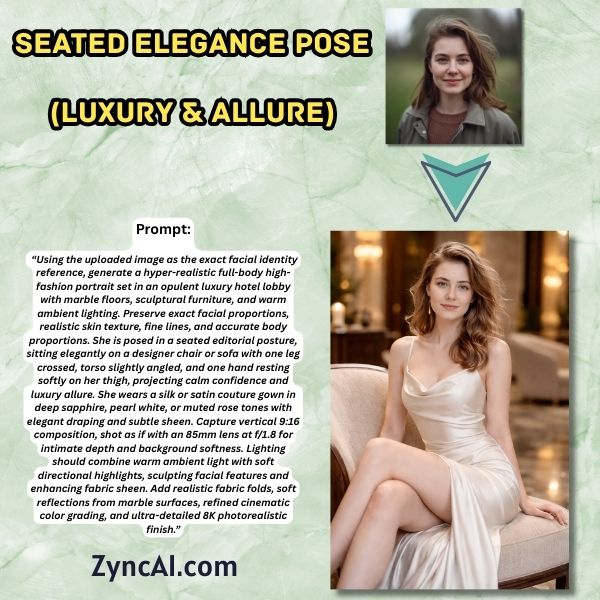
Prompt 03. Seated Elegance Pose (Luxury & Allure)
This prompt delivers a refined, luxury fashion portrait in an opulent hotel lobby, focusing on calm confidence and timeless elegance. The seated posture, gentle body angle, and flowing silk or satin gown create a soft yet powerful aesthetic that feels poised and graceful. Warm lighting, marble reflections, and intimate depth of field enhance the image with a high-end editorial finish, making it perfect for ladies seeking a sophisticated, classy Instagram look.
Prompt:
Using the uploaded image as the exact facial identity reference, generate a hyper-realistic full-body high-fashion portrait set in an opulent luxury hotel lobby with marble floors, sculptural furniture, and warm ambient lighting. Preserve exact facial proportions, realistic skin texture, fine lines, and accurate body proportions. She is posed in a seated editorial posture, sitting elegantly on a designer chair or sofa with one leg crossed, torso slightly angled, and one hand resting softly on her thigh, projecting calm confidence and luxury allure. She wears a silk or satin couture gown in deep sapphire, pearl white, or muted rose tones with elegant draping and subtle sheen. Capture vertical 9:16 composition, shot as if with an 85mm lens at f/1.8 for intimate depth and background softness. Lighting should combine warm ambient light with soft directional highlights, sculpting facial features and enhancing fabric sheen. Add realistic fabric folds, soft reflections from marble surfaces, refined cinematic color grading, and ultra-detailed 8K photorealistic finish.
Prompt 04. Runway Luxe: Dramatic Spotlight Full-Body Editorial
A couture runway-inspired scene with bold spotlight and confident stance
Prompt:
Using the uploaded image as identity reference, create a full-body couture runway portrait set on a minimalist fashion runway stage. Preserve exact facial realism, proportions, and skin texture. She wears a dramatic haute couture gown with intricate beadwork and a flowing train that cascades behind her. Capture mid-stride as if walking confidently toward the camera. Lighting consists of a strong overhead spotlight with subtle side fills, creating sculpted shadows and luminous fabric highlights. Shoot as if using a 70–200mm lens at f/2.8 for professional fashion compression. Add subtle haze in the air for depth and cinematic mood. Enhance embroidery details, reflective textures, and realistic garment movement. Editorial-level sharpness, 8K, high-fashion magazine aesthetic.
![Prompt - Runway Luxe Dramatic Spotlight Full-Body Editorial [ ZyncAI.com ]](https://zyncai.com/wp-content/uploads/2026/02/Prompt-09-Runway-Luxe-Dramatic-Spotlight-Full-Body-Editorial-ZyncAI.com-.jpg)
Prompt 05. Alpine Prism: Color-Drenched Luxury Mountain Portrait
A bold, high-fashion full-body portrait set on the terrace of a luxury mountain hotel. Vibrant colors contrast against dramatic alpine scenery for a striking editorial look.
Prompt:
Using the uploaded image as the exact facial identity reference, generate a hyper-realistic full-body high-fashion portrait set on the panoramic terrace of a luxury mountain hotel overlooking majestic alpine peaks. Preserve exact facial proportions, skin texture, natural expression, and accurate body proportions. She stands confidently against a backdrop of snow-capped mountains and deep blue skies, wearing a vibrant fuchsia or electric cobalt couture gown with flowing fabric that moves dynamically in the crisp mountain breeze. Capture vertically as if shot with an 85mm lens at f/2 to create elegant background separation while maintaining visible mountain depth. Lighting should simulate bright, high-altitude natural sunlight with crisp highlights and defined shadows, enhancing fabric texture and sculpting facial features naturally. Add subtle reflective light bouncing from hotel glass panels and polished stone flooring. Enhance vivid color contrast between outfit and alpine scenery, realistic fabric folds, wind interaction in hair, and natural skin micro-details. Cinematic high-fashion color grading, ultra-detailed 8K photorealistic finish.
![Prompt - Alpine Prism Color-Drenched Luxury Mountain Portrait - Beautiful Colorful Lady Luxury Portrait Prompts [ ZyncAI.com ]](https://zyncai.com/wp-content/uploads/2026/02/Prompt-19-Alpine-Prism-Color-Drenched-Luxury-Mountain-Portrait-Beautiful-Colorful-Lady-Luxury-Portrait-Prompts-ZyncAI.com-.jpg)
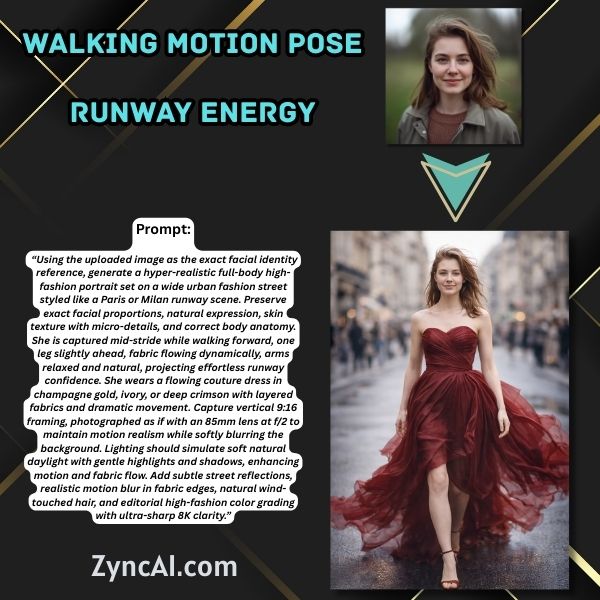
Prompt 06: Walking Motion Pose (Runway Energy)
This prompt creates a dynamic runway-style fashion image that captures you mid-stride, bringing movement and elegance into the frame. Set on a fashion street inspired by Paris or Milan, it emphasizes flowing couture fabric, natural walking posture, and soft daylight to produce an effortlessly stylish, editorial feel. The motion, fabric flow, and subtle blur make this pose ideal for ladies who want high-energy, Instagram-ready fashion visuals that feel alive and authentic.
Prompt:
Using the uploaded image as the exact facial identity reference, generate a hyper-realistic full-body high-fashion portrait set on a wide urban fashion street styled like a Paris or Milan runway scene. Preserve exact facial proportions, natural expression, skin texture with micro-details, and correct body anatomy. She is captured mid-stride while walking forward, one leg slightly ahead, fabric flowing dynamically, arms relaxed and natural, projecting effortless runway confidence. She wears a flowing couture dress in champagne gold, ivory, or deep crimson with layered fabrics and dramatic movement. Capture vertical 9:16 framing, photographed as if with an 85mm lens at f/2 to maintain motion realism while softly blurring the background. Lighting should simulate soft natural daylight with gentle highlights and shadows, enhancing motion and fabric flow. Add subtle street reflections, realistic motion blur in fabric edges, natural wind-touched hair, and editorial high-fashion color grading with ultra-sharp 8K clarity.
Prompt 07. Urban Edge: Neon Night Full-Body Fashion
Description:
A bold nighttime street-style image with dramatic neon reflections and strong attitude.
Prompt:
Using the uploaded image as the facial identity reference, generate a full-body hyper-realistic urban fashion portrait set on a downtown street at night with neon signage and wet pavement reflections. Preserve exact facial realism and natural body proportions. She stands confidently under glowing neon lights wearing a black leather jacket over a fitted top, tailored high-waisted trousers, and heeled boots. Capture vertically with an 85mm lens at f/1.8 to create shallow depth of field while keeping city lights beautifully blurred in bokeh. Add realistic reflections of neon pink and blue lights on her jacket and subtle moisture texture on the pavement. Lighting combines cool ambient tones with warm rim lighting to define her silhouette. Maintain detailed leather textures, realistic hair strands, and natural skin pores. Cinematic cyber-luxury grading, ultra-detailed, 8K photorealism.
![Prompt - Urban Edge Neon Night Full-Body Fashion - Cinematic Executive Colorful High Fashion Lady Prompts [ ZyncAI.com ]](https://zyncai.com/wp-content/uploads/2026/02/Prompt-07-Urban-Edge-Neon-Night-Full-Body-Fashion-Cinematic-Executive-Colorful-High-Fashion-Lady-Prompts-ZyncAI.com-.jpg)
Prompt 08. Coastal Elegance: Windswept Full-Body Fashion Portrait
A dramatic seaside fashion moment with flowing fabric and golden sunset tones.
Prompt:
Using the uploaded image, generate a vertical full-body cinematic fashion portrait set on a coastal cliff during golden hour. Preserve exact facial realism, natural proportions, and skin detail. She stands near the cliff edge wearing a flowing ivory or champagne-toned maxi dress that moves naturally with ocean breeze. Capture with an 85mm lens at f/2 aperture for shallow depth while keeping horizon softly defined. Add volumetric sunlight breaking through clouds, realistic wind motion in hair and fabric, and detailed ocean texture below. Enhance warm golden tones, soft rim lighting outlining her silhouette, and high dynamic range sky gradients. Ultra-detailed fabric folds, natural stance, cinematic color grading, 8K hyper-realistic resolution.
![Prompt - Coastal Elegance Windswept Full-Body Fashion Portrait - Natural Female Beach Fashion Portrait Prompts [ ZyncAI.com ]](https://zyncai.com/wp-content/uploads/2026/02/Prompt-15-Coastal-Elegance-Windswept-Full-Body-Fashion-Portrait-Natural-Female-Beach-Fashion-Portrait-Prompts-ZyncAI.com-.jpg)
6. Best Postures for High-Fashion AI Photos
Posture defines confidence.
Power Standing Pose
- Best for: bold, confident looks
- Works well with suits, structured gowns
- Great for personal branding
Walking / Runway Pose
- Best for: dynamic, editorial energy
- Flowing dresses shine here
- Feels natural and stylish
Seated Elegance Pose
- Best for: luxury, calm confidence
- Ideal for silk or satin outfits
- Perfect for high-end aesthetics
📌 Even with AI, posture makes or breaks the image.
7. What to Consider When Generating AI Fashion Images
7.1 Identity Preservation
Always include phrases like:
- “Exact facial identity reference”
- “Preserve facial proportions”
- “Realistic skin texture”
Skipping these causes face distortion.
7.2 Lighting & Camera Control
Mention:
- Lens type (85mm works beautifully)
- Soft frontal lighting
- Subtle rim or side light
Avoid:
- Overexposed lighting
- Harsh shadows
7.3 Outfit & Color Balance
- Limit colors to 2–3 tones
- Contrast outfit with background
- Avoid overcrowded styling
7.4 Background Selection
- Minimal backgrounds = elegant looks
- Cinematic backgrounds = dramatic impact
- Luxury interiors often look more realistic than busy streets
8. Is It Safe to Upload Your Photos? (Privacy Explained)
This is a valid concern, and you are right to think about it…
What you should know
- Most tools process images on secure servers
- Some tools store images temporarily
- Public generations may be visible to others
How to protect your privacy
- Avoid uploading sensitive or private photos
- Crop unnecessary background details
- Use tools with clear privacy policies
- Avoid linking real names to test images
📌 If privacy matters deeply, choose tools known for ethical data handling.
9. Ethical & Responsible Use of AI Fashion Images
AI images are powerful, but use them responsibly.
- Do not misrepresent yourself professionally
- Be transparent if using AI for branding
- Follow Instagram and platform guidelines
- Avoid unrealistic body alterations
AI should enhance confidence, not distort reality.
10. Common Mistakes to Avoid
Even the best AI tools can produce disappointing results if a few key details are missed. Avoiding these common mistakes will help you get cleaner, more realistic, and fashion-ready images every time.
❌ Removing Identity-Preservation Phrases
One of the biggest mistakes is removing phrases like “using the uploaded image as the exact facial identity reference” or “preserve exact facial proportions.” Without these, AI often changes facial features, expressions, or even face shape.
✅ What to do instead:
Always include identity-preservation wording to keep your face natural, recognizable, and authentic.
❌ Overloading Prompts With Too Many Styles
Adding too many styles at once, like cyberpunk, vintage, minimalist, futuristic, editorial – This confuses the AI!! The result is often messy, unrealistic, or overly artificial.
✅ What to do instead:
Stick to one clear fashion style per prompt. Clean and focused prompts deliver more polished results.
❌ Ignoring Body Proportion References
When body proportion instructions are missing, AI may create unrealistic posture, awkward limbs, or unnatural body shapes, specially in full-body fashion images.
✅ What to do instead:
Include phrases like “accurate body proportions” or “realistic anatomy” to maintain natural, elegant poses.
❌ Uploading Extremely Low-Resolution Images
Blurry, pixelated, or heavily compressed photos give the AI very little information to work with. This often leads to distorted facial details and low realism.
✅ What to do instead:
Upload a clear, well-lit photo, even if it’s taken on a phone. Clarity matters more than camera quality.
❌ Forgetting Lighting Control
Lighting is what separates a casual image from a fashion editorial. When lighting isn’t defined, images can look flat, dull, or overexposed.
✅ What to do instead:
Always mention lighting direction and mood soft frontal light, rim light, warm ambient glow, or natural daylight.
❌ Changing Too Many Elements at Once
Altering pose, outfit, background, lighting, and style in a single generation often reduces accuracy and realism.
✅ What to do instead:
Change one or two elements at a time and refine gradually for better control.
❌ Expecting Perfection on the First Try
AI image generation is iterative. Many users give up after one result, missing out on much better outputs with small refinements.
✅ What to do instead:
Treat each generation as a draft. Minor prompt tweaks can dramatically improve results.
Simple, structured prompts almost always outperform complicated ones.
Clarity beats creativity when it comes to getting high-fashion, Instagram-ready images that still look like you.
11. Final Tips for Insta-Ready Results
Keep your prompts structured and clean by focusing on one pose, one outfit style, and one lighting mood at a time. Clear instructions help the AI understand exactly what you want and produce images that look polished rather than chaotic.
- Save your best-performing prompt once you get a result you love. Reusing a proven prompt structure with small tweaks (like changing outfit color or background) gives you consistent, high-quality results without starting from scratch each time.
- Stay consistent with your visual style across posts. Whether you prefer luxury, minimal, bold, or editorial fashion, repeating similar lighting, poses, and color tones helps your Instagram feed look intentional and professionally curated.
- Experiment with different poses, outfits, and settings—but don’t overdo it in a single prompt. Too many changes at once can reduce realism. Small, thoughtful refinements usually lead to better outcomes than dramatic prompt rewrites.
- Pay attention to posture and body language. Even in AI-generated images, confident stances, relaxed shoulders, and natural positioning instantly elevate the fashion appeal and make the image feel authentic.
- Review every generated image with a critical eye before posting. Check facial accuracy, proportions, lighting balance, and outfit realism to ensure the final result still looks like you, just styled at a higher fashion level.
Most importantly, remember that confidence + clarity = stunning results ✨
AI becomes a powerful tool to help you express your personal style beautifully and effortlessly when your prompts are clear and your intent is confident.
12. FAQs
Q1. Will the AI-generated image still look like me?
A1. Yes, as long as you include identity-preservation phrases such as “using the uploaded image as the exact facial identity reference” and “preserve exact facial proportions,” the AI will maintain your facial structure and natural features while upgrading the style.
Q2. Do I need a professional photo to start?
A2. No. A clear smartphone photo with decent lighting is more than enough. AI focuses on facial clarity, not camera brand or studio quality.
Q3. Can I use selfies, or should someone else take the photo?
A3. Selfies work well, but photos taken by someone else often give better perspective and body proportions, especially for full-body fashion images.
Q4. How many times should I regenerate an image?
A4. There’s no limit. Most high-quality results come after 2 – 5 generations with small prompt refinements.
Q5. Why does my face sometimes look slightly different?
A5. This usually happens when identity-preservation wording is missing, lighting is too extreme, or too many style changes are applied at once.
Q6. Can I change outfits without changing my face?
A6. Yes. Clearly specify outfit changes while keeping facial identity references intact to ensure only the clothing and styling change.
Q7. Is it safe to upload personal photos to AI tools?
A7. Generally yes, but avoid sensitive images, read privacy policies, and use reputable tools that allow private generations.
Q8. Can I use these images for Instagram and social media?
A8. Yes. These images are ideal for Instagram, Pinterest, and TikTok, provided they follow each platform’s content guidelines.
Q9. Should I mention camera settings in every prompt?
A9. Including lens and aperture settings (like 85mm, f/1.8) helps realism but isn’t mandatory for every generation.
Q10. Why do some outfits look unrealistic or exaggerated?
A10. This happens when too many colors, fabrics, or design elements are combined in one prompt. Simpler outfit descriptions look more realistic.
Q11. Can I generate multiple poses from one photo?
A11. Yes. One reference photo can be used to create standing, walking, and seated fashion poses with separate prompts.
Q12. What’s the best background for fashion-style images?
A12. Luxury interiors, clean cityscapes, and minimal environments usually produce the most polished fashion results.
Q13. Do I need makeup in the original photo?
A13. No. AI can enhance makeup and styling naturally, even if the original photo has minimal or no makeup.
Q14. Can I control body shape and proportions?
A14. You can guide realism by including “accurate body proportions,” but avoid extreme alterations to maintain authenticity.
Q15. Why does lighting matter so much in AI fashion images?
A15. Lighting defines mood, depth, and realism. Without lighting instructions, images may look flat or artificial.
Q16. Can I reuse the same prompt every time?
A16. Yes. Reusing a strong base prompt and changing only small details leads to consistent, high-quality results.
Q17. How do I avoid an “AI-generated” look?
A17. Focus on natural lighting, realistic skin texture, and minimal post-processing language in your prompts.
Q18. Is it okay to use AI images for personal branding?
A18. Yes, as long as the images represent you honestly and are not misleading.
Q19. What aspect ratio works best for Instagram?
A19. Vertical 9:16 works best for Reels and Stories, while 4:5 works well for feed posts.
Q20. Can I generate close-up and full-body images from the same photo?
A20. Absolutely. Just specify framing clearly—face-only, half-body, or full-body.
Q21. Why does hair sometimes look unnatural?
A21. This often happens when wind, motion, or lighting isn’t specified. Adding subtle hair movement improves realism.
Q22. Do AI tools store my images permanently?
A22. Policies vary by tool. Some store images temporarily, others longer. Always review privacy settings before uploading.
Q23. Can beginners achieve professional-looking results?
A23. Yes. Well-structured prompts matter more than experience level.
Q24. Should I edit the image after generation?
A24. Minor edits like cropping or brightness adjustments are fine, but heavy editing isn’t necessary if the prompt is strong.
Q25. Can I match my Instagram aesthetic using AI?
A25. Yes. Consistently use similar lighting, colors, and poses in your prompts to match your existing feed.
Q26. How long does it take to generate one fashion image?
A26. Most tools generate images within seconds to a few minutes.
Q27. Can I use AI images for profile photos?
A27. Yes, especially if the image looks natural, professional, and clearly represents you.
Q28. What if I don’t like the first result?
A28. Small prompt tweaks usually fix issues. AI image creation is meant to be iterative.
Q29. Are AI fashion images suitable for all ages?
A29. Yes, as long as styling, outfits, and poses are chosen appropriately.
Q30. What’s the biggest secret to great AI fashion images?
A30. Clarity, patience, and confidence. Clear prompts and small refinements consistently lead to stunning results.