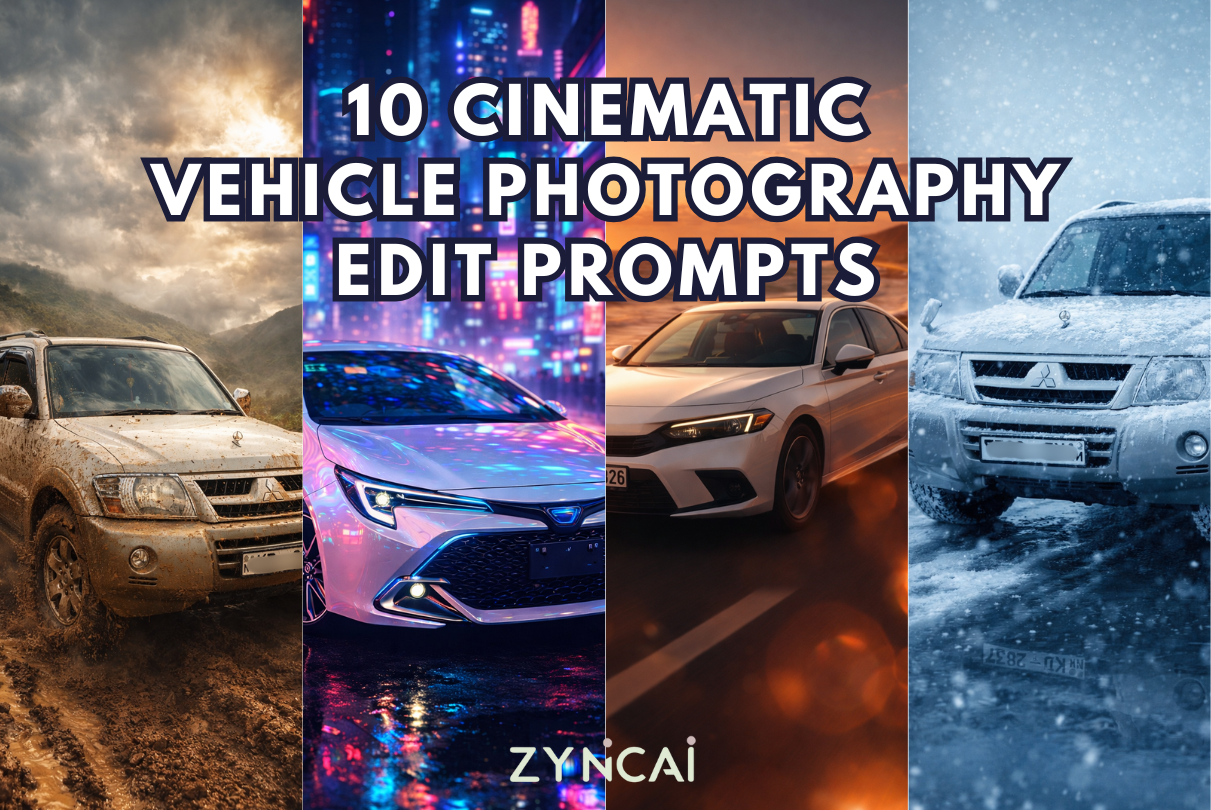
10 Cinematic Vehicle Edit Prompts: Turn Your Vehicle Photo into Cinematic Masterpieces using AI in Seconds
Creating professional automotive photos no longer requires expensive cameras, studio setups, or Photoshop skills. You can upload a simple photo of your vehicle and transform it into a cinematic, studio-quality image in seconds using modern generative AI tools like ChatGPT, Gemini, and other AI image editors.
In this guide, you’ll find 10 powerful AI vehicle photography prompts designed for realism, social media performance, and marketing use. Each prompt includes a short explanation so readers know exactly when and why to use it.
Who Are These Prompts For?
These prompts are ideal for:
- Car owners & enthusiasts
- Auto dealers & showrooms
- Automotive bloggers
- Instagram, TikTok & Pinterest creators
- Marketplace listings (used cars, rentals, modifications)
- AI creators experimenting with image editing
No design or editing experience is required.
How to Use These AI Vehicle Photography Prompts
Follow these steps for the best results:
Step 1: Choose an AI Image Tool
Use any generative AI tool that supports image upload + editing, such as:
- ChatGPT (image editing)
- Gemini
- Other AI photo editors that accept prompts
Step 2: Upload Your Vehicle Image
For best output:
- The full vehicle should be visible
- Avoid extreme angles
- Use good lighting if possible
- Higher resolution = better realism
Step 3: Copy the Prompt Exactly
Paste one of the prompts below without changing the wording.
Step 4: Refine if Needed
You can add follow-ups like:
- “Increase realism”
- “Keep original paint color”
- “Match lighting with the original photo”
- “Do not alter brand logo or wheels”
10 Vehicle Photography Edit Prompts (With Image Examples & Descriptions)
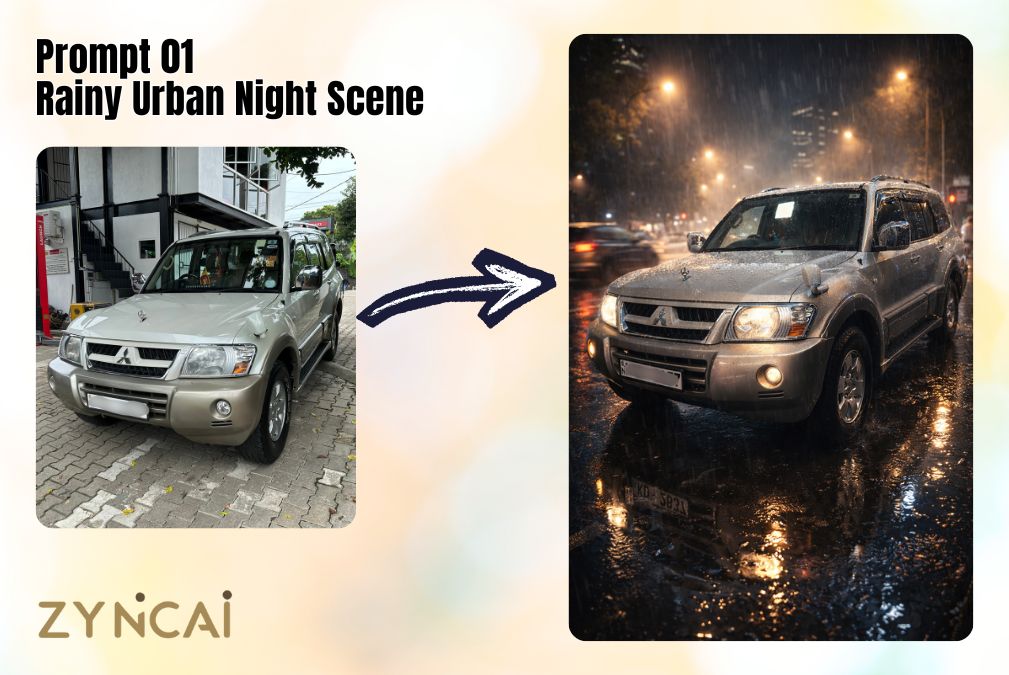
Prompt 01: Rainy Urban Night Scene
Best for: Dramatic city vibes, night aesthetics, Instagram reels, cinematic storytelling.
This prompt recreates a moody urban environment with rain reflections and glowing streetlights, perfect for modern sedans and sports cars.
Prompt:
“Use my uploaded vehicle image and place it on a wet city street at night during heavy rain. Add realistic raindrops on the car surface, puddle reflections, glowing streetlights, soft fog, motion blur from passing traffic, cinematic lighting, shallow depth of field. Shot in 8K, ultra-sharp, photorealistic, 9:16 vertical composition, professional automotive photography.”
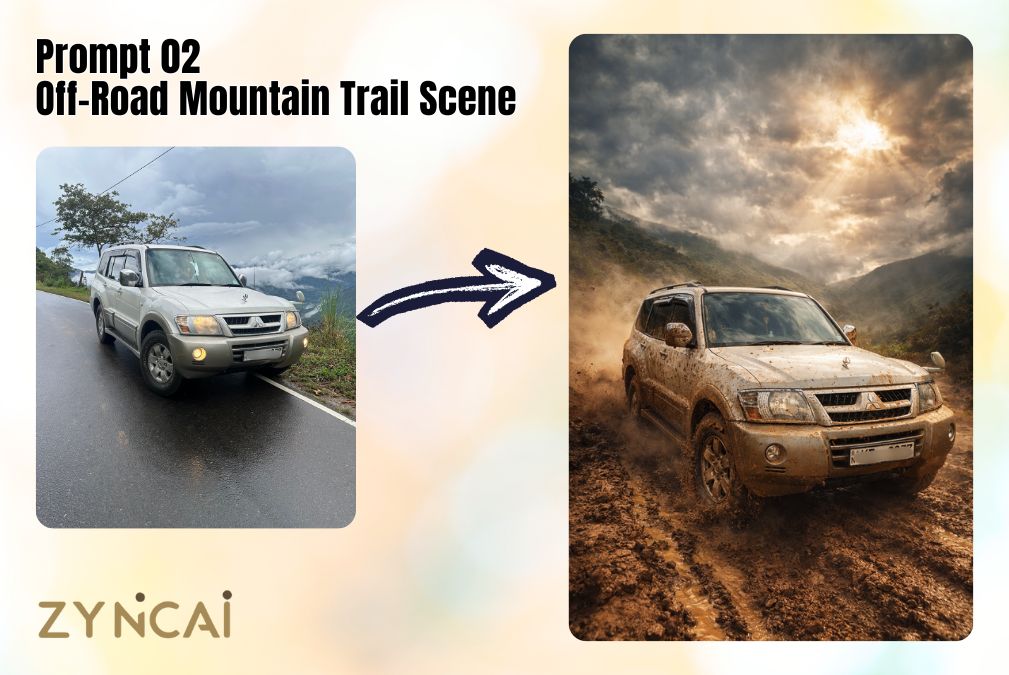
Prompt 02: Off-Road Mountain Trail Scene
Best for: SUVs, 4x4s, pickup trucks, adventure branding.
This prompt highlights power, durability, and rugged performance in a realistic off-road setting.
Prompt:
“Transform my uploaded vehicle into a rugged off-road environment on a muddy mountain trail. Add dust clouds, tire tracks, splashed mud on the body, dramatic cloudy sky, sun rays breaking through, high dynamic range lighting, shallow depth of field. Shot in 8K, ultra-sharp, photorealistic, 9:16 vertical composition, adventure automotive photography.”
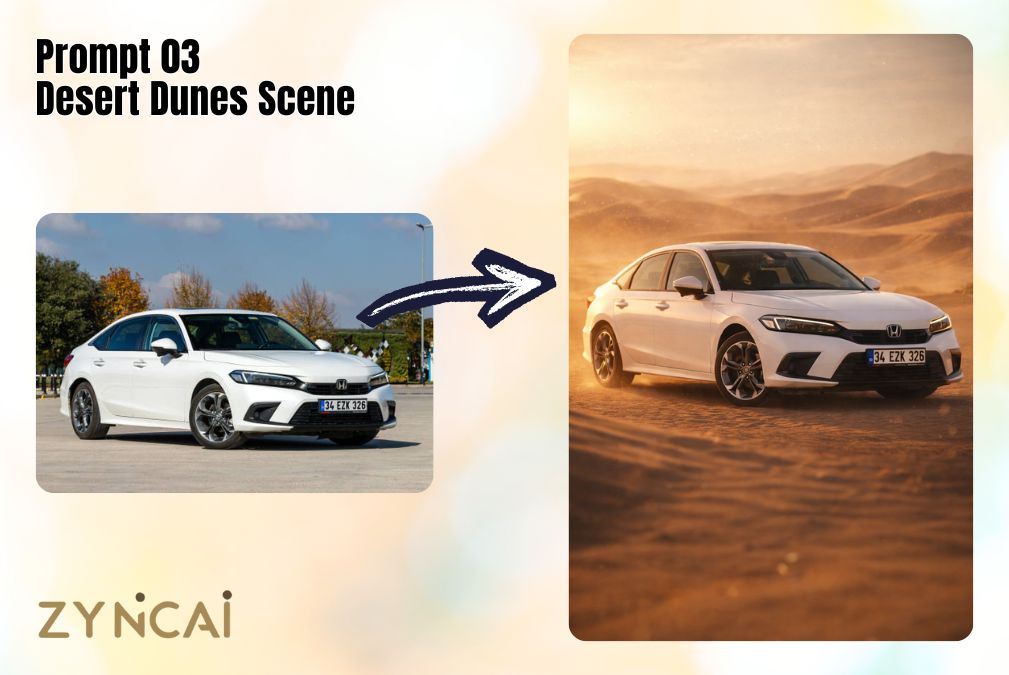
Prompt 03: Desert Dunes Scene
Best for: Bold visuals, heat-intense environments, cinematic wide shots.
Ideal for showcasing vehicle toughness and dramatic landscapes.
Prompt:
“Place my uploaded vehicle in a vast desert with rolling sand dunes, warm golden sunlight, long shadows, heat haze distortion, fine dust particles in the air, cinematic wide-angle look, shallow depth of field. Shot in 8K, ultra-sharp, photorealistic, 9:16 vertical composition, professional automotive photography.”
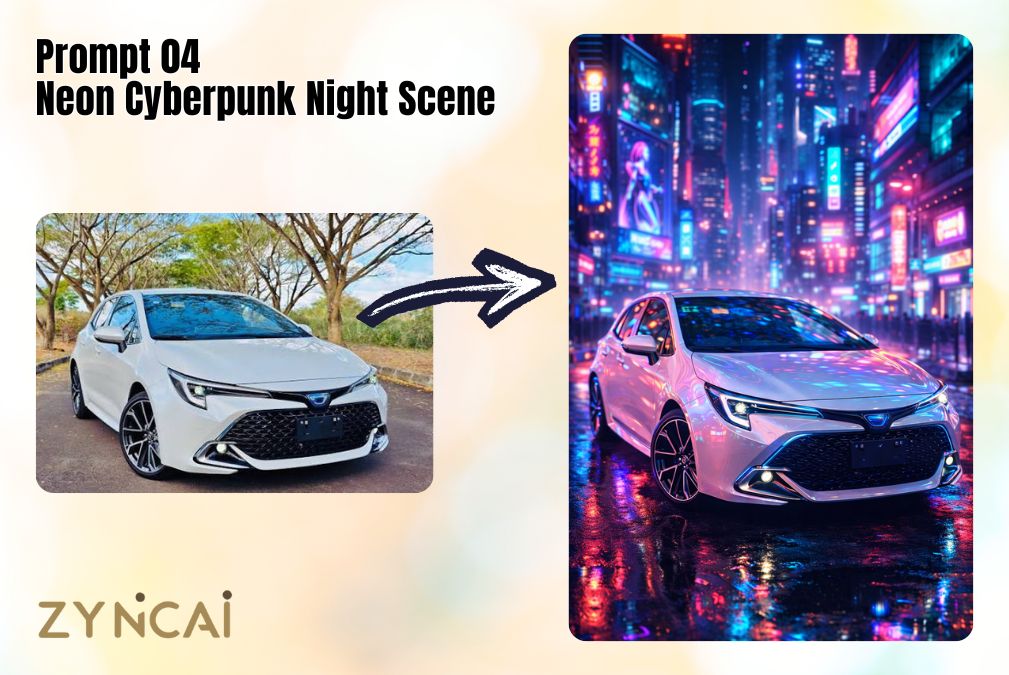
Prompt 04: Neon Cyberpunk Night Scene
Best for: Futuristic builds, electric cars, social media engagement.
This high-impact visual style works extremely well for reels and thumbnails.
Prompt:
“Use my uploaded vehicle in a futuristic neon city at night with glowing billboards, holographic signs, wet reflective streets, strong neon reflections on the car body, volumetric lighting, cyberpunk atmosphere, shallow depth of field. Shot in 8K, ultra-sharp, photorealistic, 9:16 vertical composition, cinematic automotive photography.”
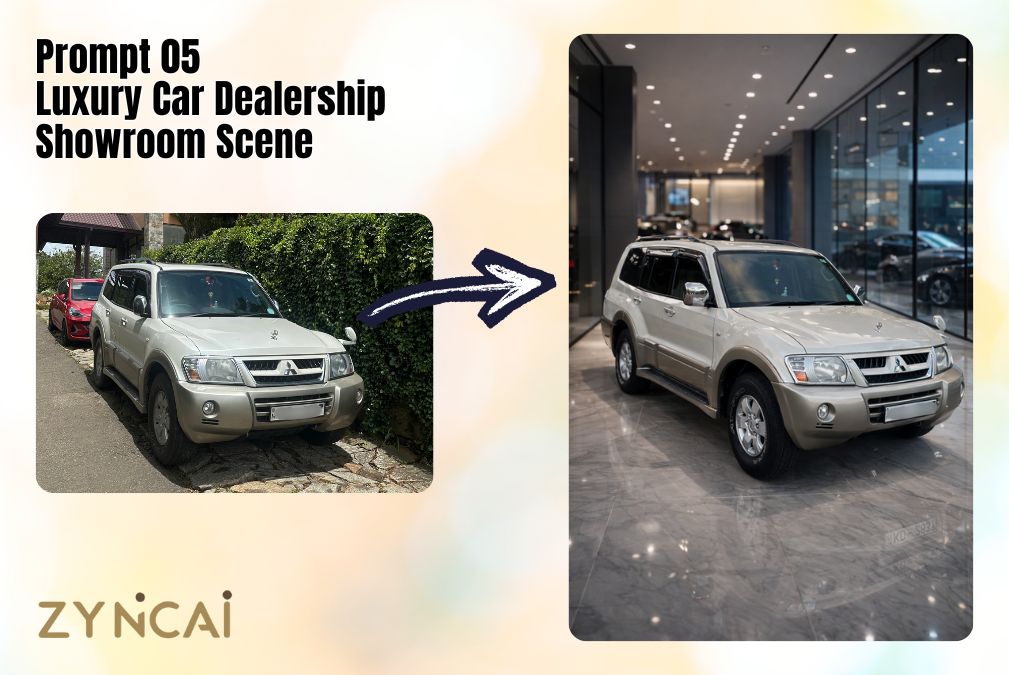
Prompt 05: Luxury Car Dealership Showroom Scene
Best for: Car sales listings, dealership promotions, premium branding.
Creates a clean, polished, high-value commercial look.
Prompt:
“Place my uploaded vehicle inside a modern luxury car dealership showroom with glossy marble floors, floor-to-ceiling glass walls, soft diffused studio lighting, subtle paint reflections, premium commercial look, shallow depth of field. Shot in 8K, ultra-sharp, photorealistic, 9:16 vertical composition, professional showroom photography.”
Prompt 06: Manufacturer Advertisement Poster Style
Best for: Promotional banners, hero visuals, brand-style images.
Perfect for creating ad-ready visuals without a studio shoot.
Prompt:
“Create a high-end automotive advertisement poster using my uploaded vehicle image. Add dramatic studio lighting, bold composition, cinematic shadows, subtle light streaks, premium brand aesthetic, shallow depth of field. Shot in 8K, ultra-sharp, photorealistic, 9:16 vertical composition, professional marketing photography.”
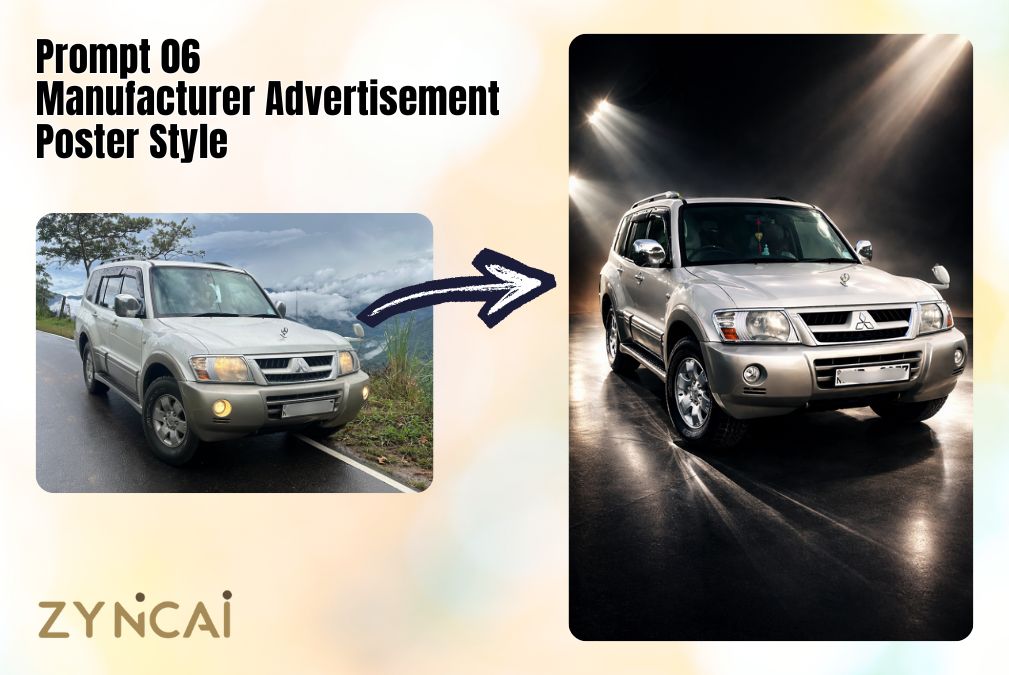
Prompt 07: Sunset Coastal Highway Scene
Best for: Lifestyle visuals, road-trip aesthetics, aspirational content.
This prompt emphasizes freedom, motion, and warmth.
Prompt:
“Use my uploaded vehicle driving along a coastal highway at golden hour. Add ocean waves, glowing sunset sky, warm sunlight flares, motion blur on the road, wind movement, cinematic lens flare, shallow depth of field. Shot in 8K, ultra-sharp, photorealistic, 9:16 vertical composition, cinematic automotive photography.”
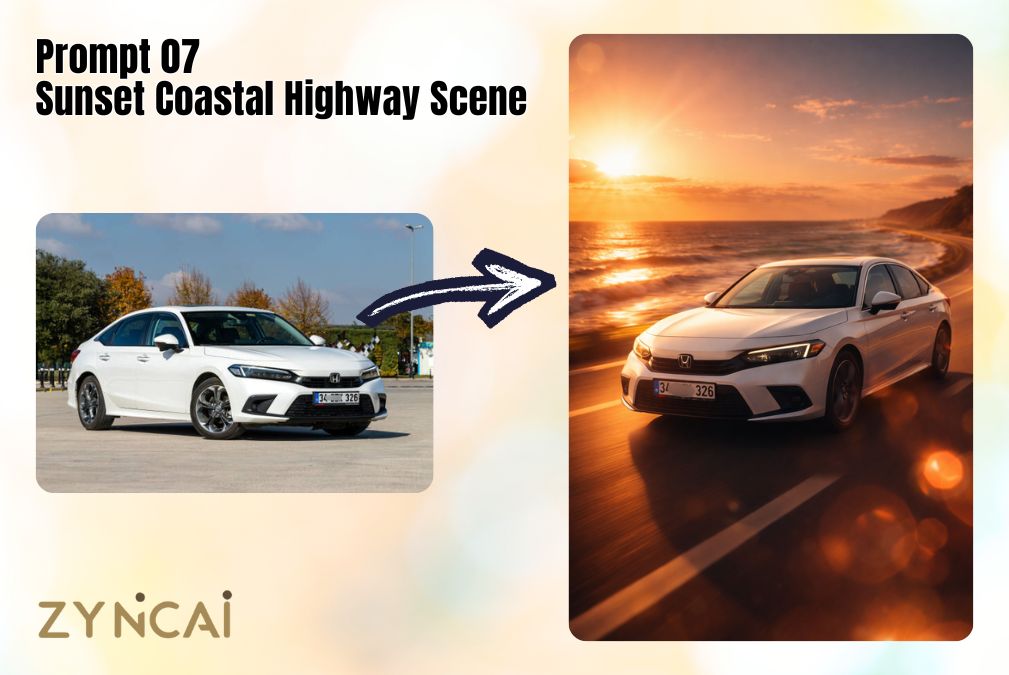
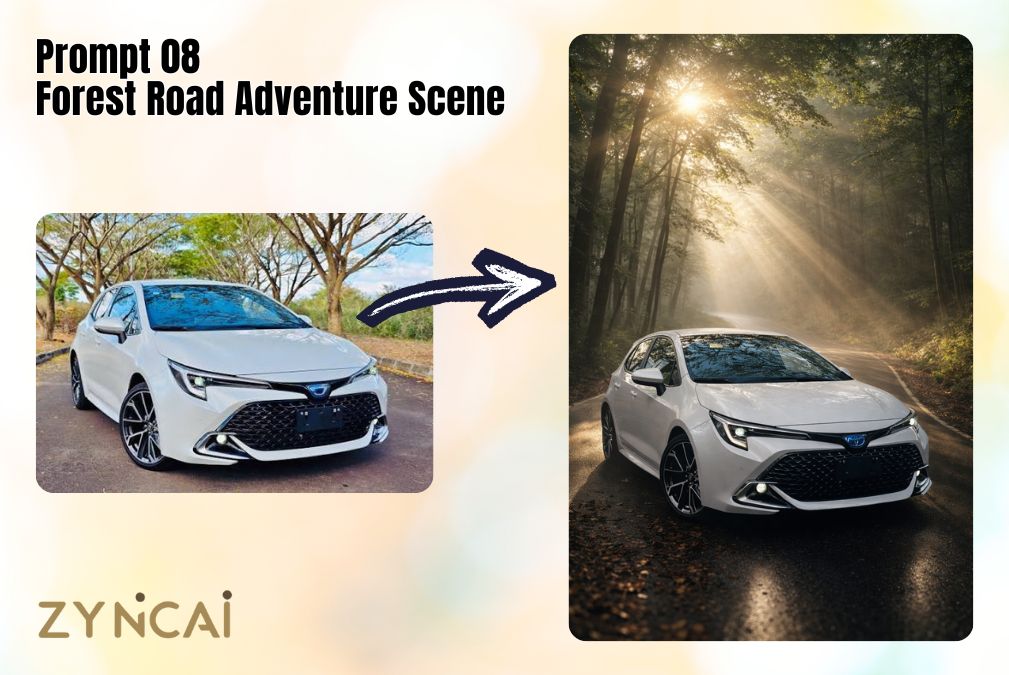
Prompt 08: Forest Road Adventure Scene
Best for: Nature-focused builds, calm cinematic visuals.
Creates a peaceful yet adventurous mood with natural lighting.
Prompt:
“Place my uploaded vehicle on a winding forest road surrounded by tall trees and soft morning mist. Add sun rays filtering through leaves, realistic shadows, natural color grading, shallow depth of field. Shot in 8K, ultra-sharp, photorealistic, 9:16 vertical composition, cinematic automotive photography.”
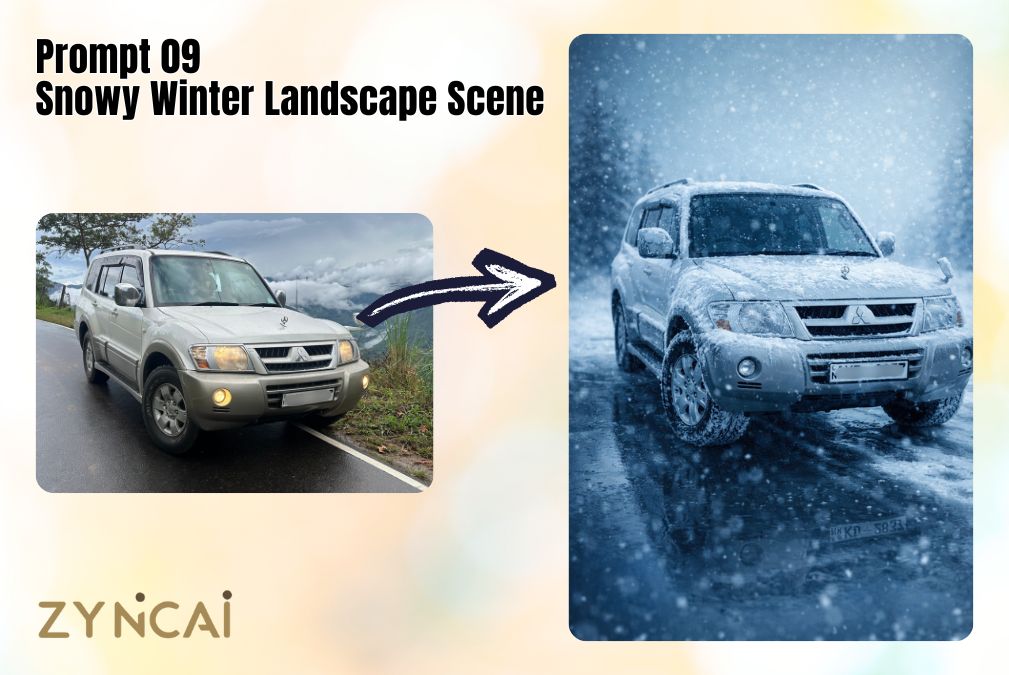
Prompt 09: Snowy Winter Landscape Scene
Best for: Winter campaigns, cold-climate visuals, dramatic contrast.
Works great for SUVs and AWD vehicles.
Prompt:
“Use my uploaded vehicle in a snowy winter environment with falling snow, icy road reflections, cold blue lighting tones, frosty atmosphere, snow buildup on tires and body, shallow depth of field. Shot in 8K, ultra-sharp, photorealistic, 9:16 vertical composition, cinematic winter automotive photography.”
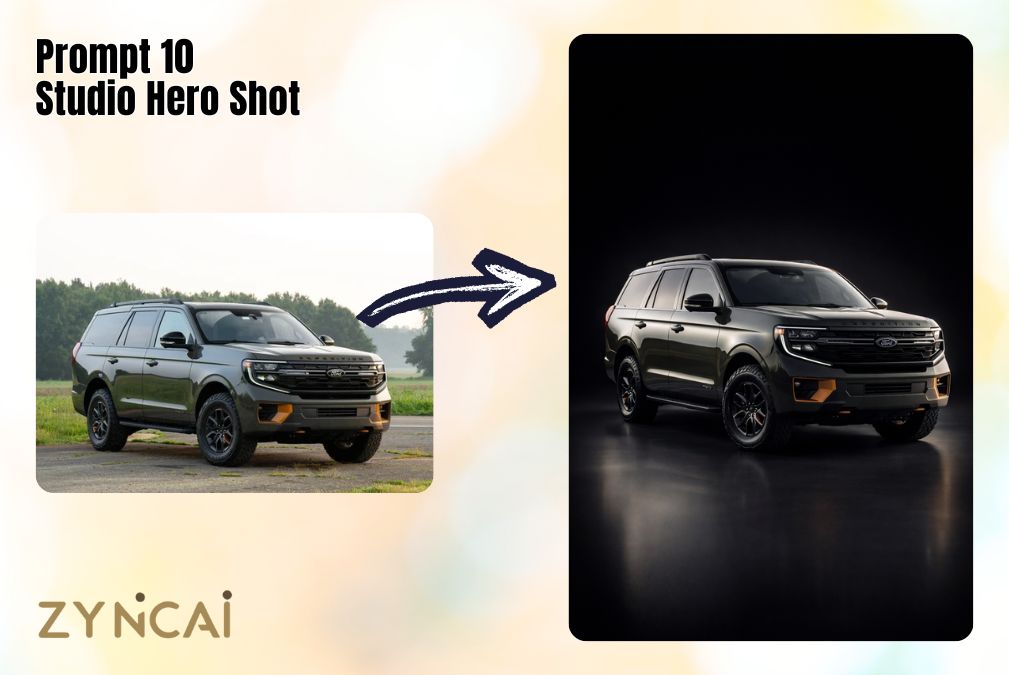
Prompt 10: Studio Hero Shot
Best for: Product pages, thumbnails, clean marketing visuals.
This is the most versatile prompt for professional use.
Prompt:
“Create a studio hero shot of my uploaded vehicle on a clean dark gradient background. Use dramatic rim lighting, soft fill light, sharp paint reflections, high contrast, shallow depth of field. Shot in 8K, ultra-sharp, photorealistic, 9:16 vertical composition, professional automotive product photography.”
Pro Tips to Get Ultra-Realistic Results
To make your AI-edited vehicle images look natural, cinematic, and professional (instead of obviously AI-generated), apply these expert-level improvements:
1. Protect the Original Vehicle Details
AI sometimes modifies wheels, headlights, logos, or even body proportions while blending the car into a new scene. If you want accuracy, especially for listings or reviews, explicitly tell the AI to preserve the original design.
Add this line when realism and authenticity matter:
“Keep the original body shape, paint color, wheel design, and brand logo unchanged.”
This is essential for:
- Dealership promotions
- Car resale platforms
- Automotive blog reviews
- Sponsored content
Authenticity builds trust.
2. Match the Environmental Lighting
Lighting direction is one of the biggest realism factors. If sunlight hits your car from the left in the original image, but the AI creates light from the right, the result will feel artificial.
Best practice:
- Bright daylight photo → Use daylight scenes
- Soft cloudy photo → Use misty or diffused environments
- Night photo → Use neon, rain, or dark cinematic scenes
You can also add:
“Ensure environmental lighting matches the original light direction.”
Correct lighting alignment instantly increases believability.
3. Generate Multiple Variations
AI outputs vary each time you generate an image. Even with the exact same prompt, reflections, shadows, and composition may change slightly.
Professional workflow:
- Generate 2–4 variations
- Compare reflections and edge blending
- Choose the most natural version
The best results often appear on the second or third attempt.
4. Use High-Resolution Base Images
AI can enhance images, but it cannot fully recover missing detail from low-quality uploads. Blurry or compressed images will limit the final output quality.
For best results:
- Use high-resolution photos
- Avoid heavy JPEG compression
- Ensure sharp vehicle edges
The cleaner the base image, the more realistic the final result.
5. Check Edge Blending Around Tires & Ground
One of the easiest ways to spot AI edits is poor ground contact. Pay special attention to:
- Tire-to-road connection
- Natural shadows under the vehicle
- Reflections on wet surfaces
If needed, refine with:
“Improve tire contact with the ground and add realistic shadow beneath the vehicle.”
Small shadow fixes make a huge difference.
6. Control Reflections on Glossy Paint
Vehicles have reflective surfaces. In scenes like rain, neon city, or showroom lighting, reflections must match the environment.
If reflections look weak or inconsistent, add:
“Enhance realistic environmental reflections on the car body.”
Consistent reflections dramatically increase realism.
7. Keep Perspective & Camera Angle Consistent
If your original image is shot at eye level, but the AI creates a dramatic low-angle cinematic shot, the perspective may look mismatched.
For better results:
- Keep camera height consistent
- Avoid extreme angle changes
- Maintain natural proportions
You can guide the AI by adding:
“Maintain original camera angle and perspective.”
8. Use Depth of Field Carefully
Shallow depth of field adds a professional look — but too much blur can make the scene look artificial.
Make sure:
- Background blur feels natural
- The vehicle remains fully sharp
- Wheels and edges are crisp
Balanced blur = premium photography feel.
9. Add Motion Effects Only When Logical
Motion blur works well in highway or action scenes, but not in showroom or studio shots.
Use motion blur when:
- The car is “driving”
- There is road movement
- Light streaks are part of the aesthetic
Avoid it in:
- Static hero shots
- Dealership interiors
- Studio product images
Context matters for realism.
10. Fine-Tune Color Grading
Different environments require different tones:
- Desert → Warm golden tones
- Snow → Cool blue tones
- Neon → High contrast with vibrant colors
- Forest → Natural greens and soft mist
If colors feel unnatural, refine with:
“Apply natural cinematic color grading.”
Subtle grading separates amateur AI edits from professional visuals.
11. Avoid Overcrowding the Scene
More effects do not always mean better results. Excess fog, rain, light streaks, and dust combined can reduce realism.
Aim for:
- One dominant atmospheric effect
- Balanced lighting
- Clean composition
Simplicity often looks more premium.
FAQs
Q1: What is the ideal image resolution to upload for best AI results?
A1: Upload the highest resolution available, ideally 2000px or more on the longest side. High-resolution images preserve fine details like paint texture, headlights, and wheel spokes, allowing AI tools to generate sharper and more realistic edits.
Q2: Can AI accurately preserve my vehicle’s brand logo and model details?
A2: Yes, but only if instructed clearly. Always include a line such as:
“Keep the original body shape, paint color, wheel design, and brand logo unchanged.”
Without this instruction, AI may subtly alter badges, grille shapes, or headlights.
Q3: Why do my wheels sometimes look distorted after editing?
A3: AI models sometimes reinterpret circular objects when blending environments. To prevent this, add:
“Preserve original wheel design and proportions.”
Also ensure your base image shows wheels clearly and not partially cropped.
Q4: How do I ensure realistic tire contact with the ground?
A4: Ground contact realism depends on shadows and perspective. Add:
“Improve tire-to-ground contact with natural shadow beneath the vehicle.”
This reduces the “floating car” effect.
Q5: Can I use these prompts for commercial car dealership marketing?
A5: Yes, especially showroom and studio prompts. However, ensure the final image accurately represents the real vehicle to avoid misleading advertising. Authenticity is critical in commercial use.
Q6: Why does lighting sometimes look unnatural?
A6: Lighting mismatches happen when the original image light direction conflicts with the new environment. Always specify:
“Ensure environmental lighting matches original light direction.”
Q7: Is it better to crop the image before uploading?
A7: Yes. Crop out unnecessary background clutter. Clean framing allows AI to focus on the vehicle and improves blending accuracy.
Q8: Can I change the color of my car using these prompts?
A8: Yes, but do so intentionally. Add a specific instruction such as:
“Change paint color to metallic midnight blue with realistic reflections.”
Otherwise, AI may unintentionally shift tones during environmental blending.
Q9: How do I achieve ultra-realistic reflections on glossy paint?
A9: Reflections must match the environment. Add:
“Enhance realistic environmental reflections on the car body.”
This is especially important in rain, neon, or showroom scenes.
Q10: Why do some AI-generated images look overly dramatic?
A10: Excessive effects like fog, dust, and lens flare can reduce realism. Simplify the scene and focus on one dominant atmosphere for a more professional look.
Q11: Can these prompts work for motorcycles or trucks?
A11: Yes. The prompts are adaptable for motorcycles, pickup trucks, SUVs, and even heavy vehicles. Simply ensure your uploaded image clearly shows the full vehicle.
Q12: How many times should I regenerate the same prompt?
A12: At least 2–4 times. AI outputs vary slightly with each generation. Professionals compare variations and choose the most realistic result.
Q13: Does vertical 9:16 composition improve engagement?
A13: Yes. Vertical images perform better on platforms like Instagram Reels, TikTok, Pinterest, and YouTube Shorts because they fill mobile screens.
Q14: How do I avoid the “AI look”?
A14: Focus on:
- Correct lighting direction
- Realistic shadows
- Balanced depth of field
- Accurate reflections
Avoid overly saturated colors or exaggerated glow effects.
Q15: Can I use these AI images for YouTube thumbnails?
A15: Absolutely. Studio hero shots and neon scenes work particularly well for high-click thumbnails due to contrast and visual intensity.
Q16: What’s the best environment for resale listings?
A16: Studio hero shot or luxury showroom scenes work best. They create a clean, distraction-free presentation and highlight the vehicle clearly.
Q17: Why does AI sometimes slightly change body proportions?
A17: When heavily modifying environments, AI may reinterpret perspective. Add:
“Maintain original camera angle, proportions, and perspective.”
Q18: Can I combine two prompts into one?
A18: Yes, but keep instructions concise. For example, blending “rainy night” and “neon cyberpunk” can work if lighting logic remains consistent.
Q19: Are AI-generated vehicle photos SEO-friendly?
A19: Yes, if optimized correctly. Use descriptive file names, alt text, and structured captions like:
“Red SUV in cinematic rainy night urban environment.”
Q20: What is the biggest mistake beginners make?
A20: Overcomplicating the prompt with too many effects at once. Clean, focused instructions produce more realistic and professional results than overly crowded scenes.